Offline
Offline notes app, no account needed
Can you keep notes with no internet, no account, and an app that never talks to our cloud? Yes. Notes live on your device, and Only on this device mode switches off everything that reaches the FixNote server.
Plan: Free
The problem
Cloud note apps often won't open on a plane or out of signal range, and many won't work at all without an account. Work notes under an NDA sometimes must never touch the internet.
How to set it up
- 1
Install the app. Download FixNote for Windows or macOS and start writing. No account needed.
- 2
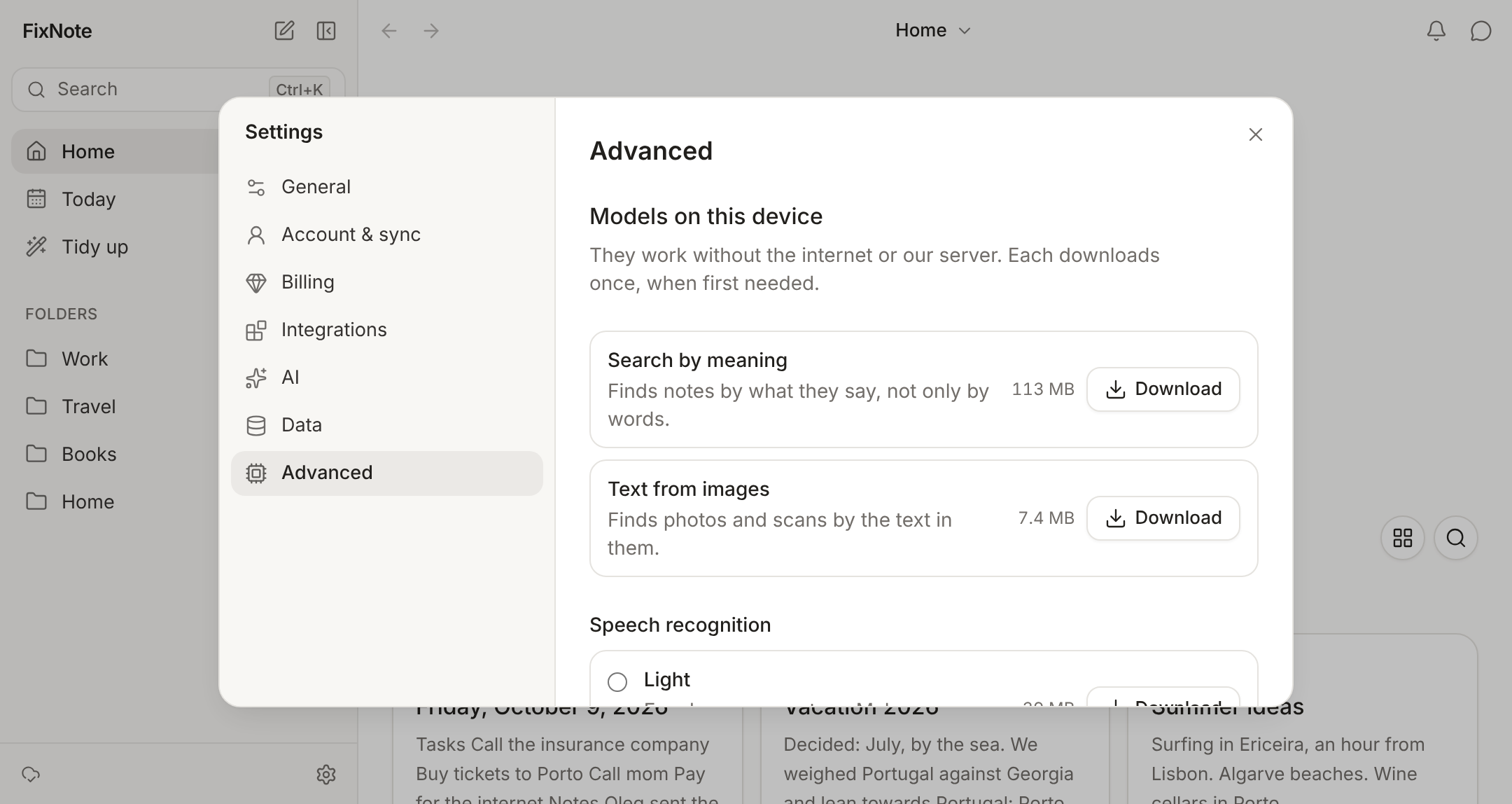
Get the models in advance. In Settings → Advanced → Models on this device, click Download for search by meaning, text from images and speech recognition. After that they need no connection.
- 3
Turn on the mode. In Settings → AI, tick Only on this device. Sync, Telegram and FixNote AI switch off.
- 4
Connect Ollama. For an assistant that answers offline, install Ollama and pick it in Settings → AI → Model.
How to turn on Only on this device
The mode lives in the desktop app. Open Settings → AI and tick Only on this device below the model choice. The app switches off sync, the Telegram bot, shared notes and links, FixNote AI and your own model key, and the assistant moves to Ollama. In the sidebar, the sync status is replaced by “Only on this device”; clicking it opens the AI settings.
For the assistant, install Ollama and pull a model, for example ollama pull llama3.1. In Settings → AI → Model, choose Ollama: FixNote finds the installed models on its own, and the Check button tells you whether the selected one answers.
If you’re signed in, you stay signed in; nothing is sent or fetched. Turn the mode off and your changes go up with the next sync.
When it helps
On a plane or a train you can write, dictate and search by meaning, since speech is recognised on the device. Notes under an NDA and health records stay on the computer with Only on this device turned on. Call summaries skip our server too: the call is transcribed on the device and, with Ollama, a local model writes the summary.
Answers from a local model depend on its size and on your computer: small models are faster but slip more often on long questions. The mode also suits a computer that’s rarely online. If you need sync later, turn the mode off and sign in; your notes stay where they are.
When another tool is a better fit
If you need your notes offline on a phone, FixNote isn’t the best choice: on phones it runs as the web app, which needs a connection to load. Obsidian and Joplin have phone apps that keep notes on the device itself. See the Obsidian comparison.
Privacy notes
In Only on this device mode the app never contacts the FixNote server, so notes, attachments and settings stay on the computer. The on-device models are downloaded once, and the desktop app still checks for updates. Read the privacy policy.
Questions
- Do I need an account to use FixNote?
- No. Without one you get notes and folders, search by words and by meaning, dictation, text from images, the daily note, import and export. That's the Free plan, with no time limit.
- What happens to my changes when the connection drops?
- They're saved on the device. On Pro the sync status reads "Offline. Changes will sync when you are back online.", and they go up on their own once you're connected.
- Does the assistant work offline?
- Yes, with Ollama: the model runs on your computer. Ollama is available in the desktop app.
- Does the web app work offline?
- The web app keeps notes in the browser and carries on in an open tab if the connection drops. It can't load again without a connection, so install the desktop app for offline work.
Try FixNote
Free, no account needed: Windows, macOS and the web.